




Equipment Augments
Augments are randomized bonuses on weapons and tools. Each equipment piece has augment slots. Each slot holds one effect with a rarity tier (common, uncommon, and higher). Stronger tiers mean stronger numbers. For example, more pierce or more damage.
Rerolling
Section titled “Rerolling”- Open an item’s detail panel and use Reroll augments to open the roll UI.
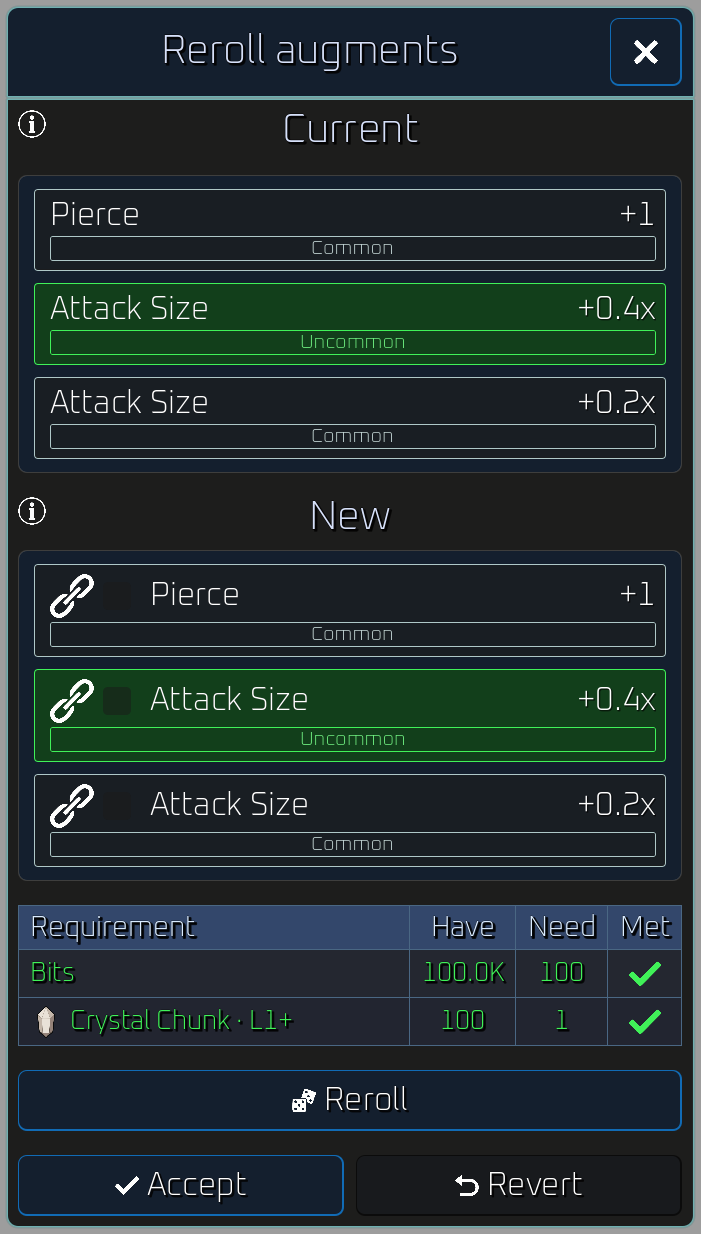
- Spend crystal chunks (and other costs shown) per roll.
- Lock slots you want to keep. Only unlocked slots change on the next roll. More locks increase the cost per roll (see each item’s Augment reroll costs table).
- Preview outcomes in the roll UI, then Accept to apply or Revert to burn rolls without changing what you have equipped.
- Press Auto-reroll under Reroll to keep rolling, with every roll on screen, until an unlocked slot shows an augment type and rarity you picked. The gear button beside it opens the settings where you switch on the types and rarities to stop on (Epic and above by default). Auto-reroll stops the moment something matches, when you run out of materials, at the session limit, or when you tap Stop auto-reroll, then leaves the choice of Accept, lock or Revert to you.
Progression
Section titled “Progression”- Equipment gains experience from use during exploration runs (weapons from kills, mining tools from ore and monolith mining progress).
- Experience is stored on the item and unlocks more augment slots at per-item thresholds. Every piece starts with 1 slot at 0 experience.
- Each weapon or tool page lists its augment slot breakpoints (experience → slot count) and maximum slots.
Rarity tiers
Section titled “Rarity tiers”Each rolled augment has a tier that sets how strong the effect is:
| Tier | Name |
|---|---|
| 0 | Common |
| 1 | Uncommon |
| 2 | Rare |
| 3 | Epic |
| 4 | Legendary |
| 5 | Mythic |
Higher tiers mean larger bonuses (for example, more damage or pierce on the same augment type). Mythic is the strongest tier and is five times as rare as Legendary.