




Marketplace
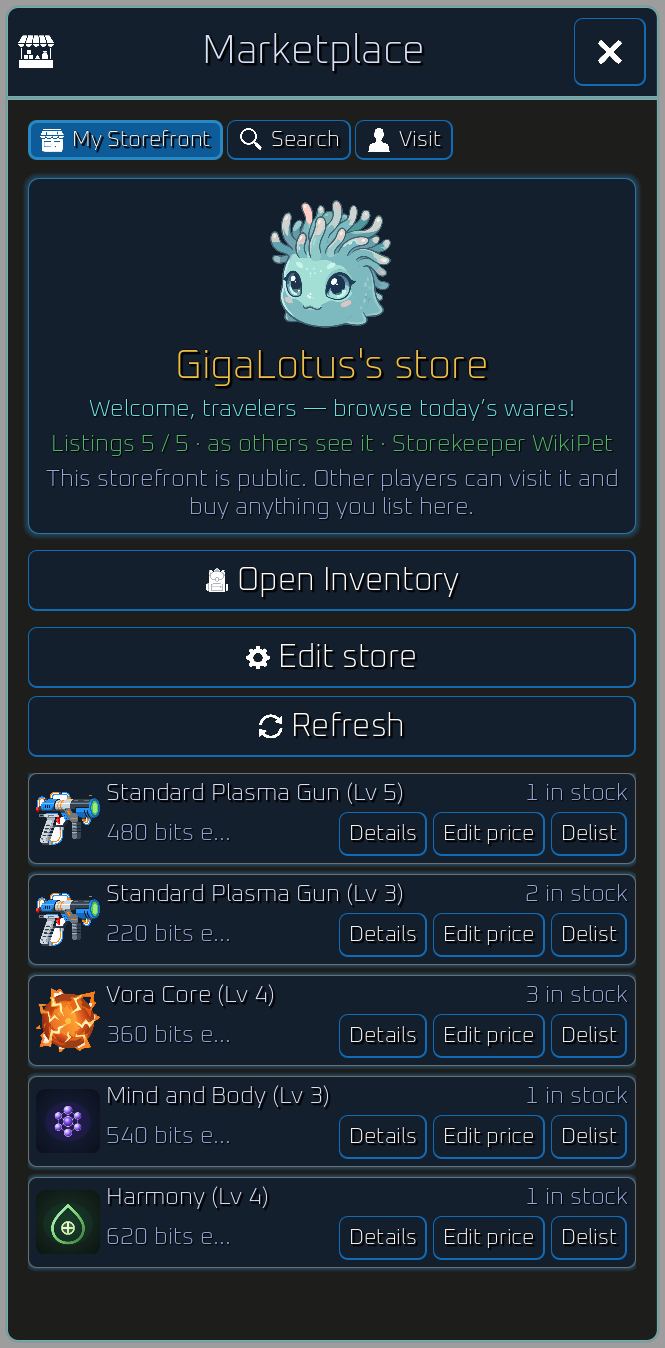
The Marketplace lets players list inventory items on a public storefront and buy from other players’ stores. Prices are in bits. There are no listing fees or taxes.
This is separate from the Commerce Module, which buys items from the ship for instant bits.
Getting started
Section titled “Getting started”- Open Marketplace from the ship hub.
- Marketplace actions unlock once the highest pet on the ship has reached level 40. Until then, the storefront remains available to view and its actions show the unlock requirement.
- My Storefront is the default tab. It shows your store title, greeting, listing slots, and everything you have listed.
- Your storefront is public. Other players can visit it and buy anything you list.
Listing items
Section titled “Listing items”- From main inventory, open an item and choose List in store.
- Set quantity and a price of at least 1 bit per unit.
- List from main inventory. Equipped gear, pouch items, ship modules, and the Commerce Module cannot be listed. Unplaced artifacts can be listed. Artifacts already placed on the ship cannot.
- Each listing row uses one slot. You start with 5 slots. Marketplace store capacity research adds more (up to 105 total at max research).
- Listing the same item spec, level, and stats as an existing stack merges quantity into that row and applies the new price to the whole stack.
Search and Visit
Section titled “Search and Visit”- Search finds listings by item name. Optional filters include a seller name (at least 4 characters) and optional min or max item level.
- Visit opens another player’s storefront when you enter their display name (at least 4 characters).
- Search never shows your own listings. You cannot buy from yourself.
- Search and Visit each have a 10-second cooldown after a press. The button disables and shows a countdown until it can be pressed again.
Buying
Section titled “Buying”- Tap Buy on a listing row or from item details on a listing snapshot.
- Choose quantity (default 1). Partial purchases are allowed when multiple units are listed.
- Bits move to the seller when the purchase completes. The item goes to your main inventory and stack-merges with matching rows when possible.
Managing your store
Section titled “Managing your store”- Edit store sets your storefront title, greeting, and optional storekeeper pet preview on Visit and My Storefront.
- Delist or Edit price on your My Storefront rows.
- Tap Refresh to pull the latest listings after another player buys from you. The tab also updates when you list, delist, or change prices.