




Missions
After first Resistance contact, the ship shows a Missions pin next to the Signal Log pin. Opening it lists Resistance missions the player can complete for Reputation and other rewards. Higher reputation results in promotions to higher Mission Ranks. The ship top HUD next to Bits and Comfort shows Rank as the Missions icon, the current Reputation score, and the rank name.
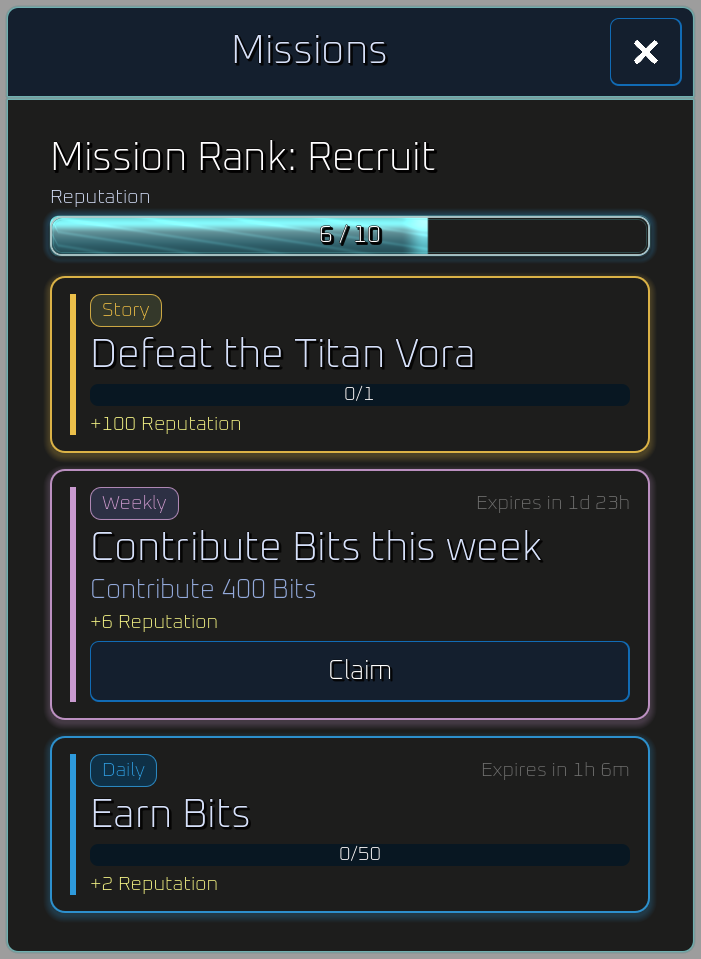
Missions are a separate progression system from Milestones and region or zone milestones.
How they unlock
Section titled “How they unlock”The pin appears on the ship hub after the Resistance contact transmission completes (the first Region 2 exploration run that finds that reply, recorded in the Signal Log). It stays visible even when every current mission is claimed. It does not appear during an exploration run.

A quiet attention dot on the pin means there is something to do (an unpaid contribution, a new story row, or a new rank). The pin has no numeric count.
Rank and Reputation
Section titled “Rank and Reputation”Completing missions (and small rewards from new Hive best depth and newly finished region or zone milestones) adds Reputation. Reputation is not spent. It maps onto named ranks. Higher ranks unlock more daily and weekly slots and scale rotating mission requirements and payouts.
| Rank | Reputation | Daily | Weekly |
|---|---|---|---|
| Recruit | 0 | 1 | 1 |
| Initiate | 10 | 1 | 1 |
| Cadet | 20 | 1 | 1 |
| Specialist | 120 | 2 | 1 |
| Vanguard | 720 | 2 | 1 |
| Overseer | 4,300 | 2 | 2 |
| Commander | 26,000 | 2 | 2 |
| Sovereign | 160,000 | 3 | 2 |
| Ascendant | 960,000 | 3 | 2 |
| Paragon | 5,800,000 | 3 | 2 |
| Apex | 35,000,000 | 3 | 2 |
| Zenith | 210,000,000 | 3 | 2 |
Current missions
Section titled “Current missions”The player sees a list of all current missions, sorted story, then weekly, then daily. Each mission shows a kind badge, title, progress or contribution cost, a countdown on rotating rows, and a row of reward chips.
| Kind | Cadence | What it is |
|---|---|---|
| Story | Stays until finished | One active mission at a time. These are core story progression missions. |
| Weekly | Rotates Monday 00:00 UTC | Resource contribution missions to aide in the resistance |
| Daily | Rotates 00:00 UTC | Short milestones often attainable in a single run. |
The number, difficulty, and rewards of weekly and daily missions increase with reputation and Mission Rank. In-progress daily or weekly progress is lost when that mission expires.
Use the rank slider on each rotating mission to see the requirement and reward at that Standing rank.
Defeat the Titan Vora
Section titled “Defeat the Titan Vora”Story.
| Stat | Value |
|---|---|
| Required: Titan Vora defeated | 1 |
| Reward: Reputation | 100 |
Defeat the Crystalline Vora
Section titled “Defeat the Crystalline Vora”Story.
| Stat | Value |
|---|---|
| Required: Crystalline Vora defeated | 1 |
| Reward: Reputation | 1000 |
Defeat the Gate Vora
Section titled “Defeat the Gate Vora”Story.
| Stat | Value |
|---|---|
| Required: Gate Vora defeated | 1 |
| Reward: Reputation | 1000 |
Contribute Resources to the Resistance
Section titled “Contribute Resources to the Resistance”Weekly.
Contribute Resources to the Resistance
Section titled “Contribute Resources to the Resistance”Weekly.
Recover items
Section titled “Recover items”Weekly.
Activate monoliths
Section titled “Activate monoliths”Daily.
Defeat Voras
Section titled “Defeat Voras”Daily.
Earn Bits
Section titled “Earn Bits”Daily.
Finish one explore
Section titled “Finish one explore”Daily.
Completing a Mission
Section titled “Completing a Mission”- Daily missions never take Bits or Oil from the balance. Weekly missions may ask you to contribute Bits or Oil.
- Contribution missions ask the player to deliver Bits, Vora Oil, or similar into the Resistance pool to aide in the effort. Contributions can be partial. Drag the slider to pick how much of the remaining need to give this time, and a confirmation table shows exactly what will leave your balance or inventory before you commit. After you confirm, a loading overlay covers the missions list until the contribution is recorded. What you have already given is remembered, so you can top a mission off across several visits. The row stays disabled with a short reason if the player has nothing left to give.
- Weekly missions also pay Gems on completion, on top of their other rewards. The amount equals your Mission Rank number (Recruit is rank 1, so 1 Gem, and each promotion adds one more Gem per weekly). Each weekly row shows a Gem reward chip so the payout is visible before you commit. Dailies and story missions do not pay Gems.
- When a mission finishes, a Mission Complete! notice opens. It is a two-column table, not a stack of mission titles. Each finished mission is one row. Mission names the kind, the title, and the requirement that was met. Rewards lists Reputation (and Bits or Gems, when that mission paid them). If several missions finish in the same visit (for example two dailies after one run), they share that one table.